
Updated October 2026
MANGO is an AI-powered OCR document automation tool built by Consultare exclusively for SAP Business One. It reads incoming invoices, purchase orders, sales orders, bank statements, expense bills, and other business documents, validates the data against your live SAP Business One master data, and posts it automatically through SAP’s Service Layer API.
Your team reviews only the exceptions.

If your team handles documents for SAP Business One, you probably recognize at least three of these.
Your AP team receives invoices every week and keys each one into SAP Business One manually.
Some suppliers send PDFs, others spreadsheets, scans, or photos, and each needs its own handling.
Wrong vendor codes, item numbers, or GL accounts slip in during manual entry and surface later.
Purchasing and finance trade emails to match vendor documents against purchase orders.
Bank statements are mapped to GL accounts and business partners line by line.
More orders and more suppliers mean more people doing the same repetitive entry.
Each of these comes from the same gap: the manual step between receiving a document and having it live in your ERP. Here is what changes when MANGO closes it.
| What you manage | Manual processing | With MANGO |
|---|---|---|
| Data entry | Every field typed into SAP Business One | Data extracted from the document and posted automatically |
| Document formats | Each format handled differently | PDFs, spreadsheets, scanned files, and images through one pipeline |
| Validation | Errors caught later, if at all | Vendor codes, item numbers, tax codes, GL accounts, warehouses, branches, and business partners checked against live SAP Business One master data |
| Review | Every document checked by a person | Only exceptions reach your team: mismatches, missing fields, duplicates, and low-confidence extractions |
| Purchase order matching | Emails between purchasing and finance | Vendor documents matched against existing purchase orders during validation |
| Bank statements | Mapped line by line at month end | Mapped to the right GL accounts and business partners automatically |
| Posting | Manual entry in the SAP Business One client | Posted through SAP’s Service Layer API as a draft or a fully posted record, based on your rules |
| Multiple companies | Separate processes for each company | All SAP Business One companies managed from one platform, with company-specific rules and role-based access |
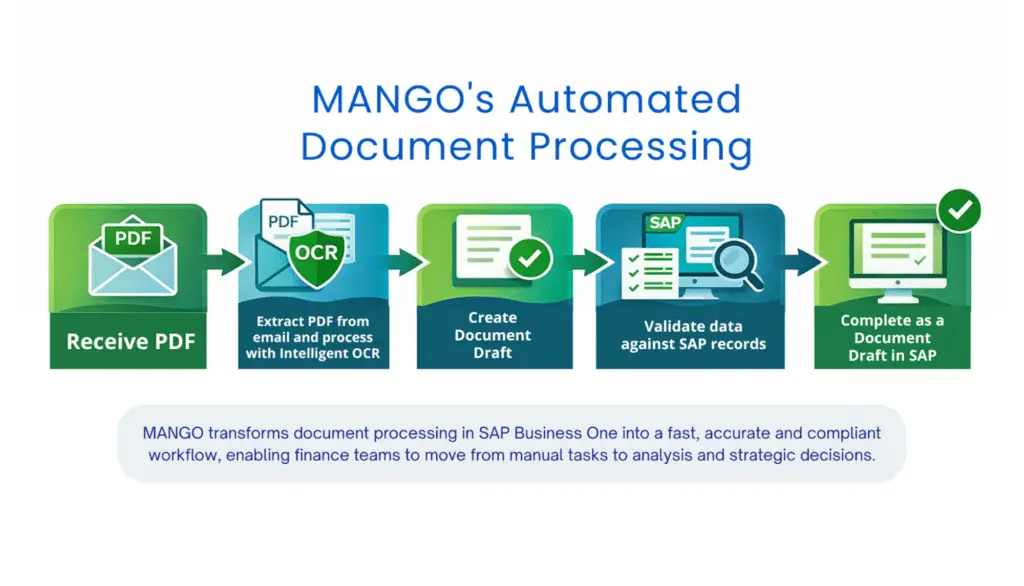
MANGO follows five steps, with your business rules applied at every stage.
MANGO supports AP invoices, purchase orders, sales orders, journal entries, expense bills, bank statements, and reconciliation documents, each with its own mapping, validation, and posting rules. Read the full MANGO overview
Used across industries: distributors automate AP invoices, pharmaceutical companies take manual entry out of receiving, and medical device service companies process parts invoices and delivery notes.
Customer story: CE North America uses AI document reading to turn incoming documents into sales orders in SAP Business One, with no manual entry.
Handle more suppliers and more volume without adding AP headcount at the same rate, with the tool built and supported by your ERP partner.
Fewer keying errors, exceptions-only review, and bank statements mapped automatically, so month-end reconciliation takes less manual work.
Stop retyping invoices and purchase orders, and spend your time on the documents that actually need a decision.
MANGO is an AI-powered OCR document automation tool built by Consultare exclusively for SAP Business One. It reads incoming business documents, extracts the data, validates it against your SAP Business One master data, maps it to the correct fields, and posts it automatically.
MANGO supports AP invoices, purchase orders, sales orders, journal entries, expense bills, bank statements, and reconciliation documents. It accepts PDFs, spreadsheets, scanned files, and image-based documents.
MANGO posts data through SAP’s Service Layer API, the same structured channel SAP uses for integrations. Each document is created as a draft or a fully posted record, depending on the posting rules you set.
It flags it. Mismatches, missing fields, duplicates, and low-confidence extractions go to your team for review. Everything that meets your validation criteria moves forward automatically.
Yes. Businesses running more than one SAP Business One company can manage all of them from a single platform, with company-specific settings, rules, and role-based access controls.
Everything MANGO posts is a standard SAP Business One document in your own database, created through SAP’s Service Layer API. Consultare built MANGO and supports it directly, so the team that implements your ERP is the team that maintains the tool.
Cost depends on your document volume, the document types you automate, and how many SAP Business One companies you run. Consultare provides a tailored estimate after a short discovery conversation.
Tell us which documents your team keys in today and how many arrive each month, and we will show you what MANGO looks like on your own documents.
Please fill out the form below, and an advisor will get back to you to schedule a demonstration.
Please fill out the form below, and we will email you a copy of Successful ERP Implementations.